nopter 


Easy command-line executable utilities for Node.js
- Easy to write
- Easy to test
- Easy to maintain
- Built on nopt (npm's option parser)
Installation
Node.js ~0.10 is required. Type this at the command line:
npm install nopter --save-dev
Option Parsing
Options are defined with config() and serve as documentation for the help screen. The example below parses args and options from process.argv, leaving any remaining args not consumed by options as input()._remain.
#!/usr/bin/env node

var nopter = new (require("nopter"))();

nopter.config({
	title: "Image Compressor",
	name: "imgc",
	version: "1.0.0",
	options: {
		"compression": {
			short: "c",
			info: "Compression level (0–100, default=80).",
			type: Number,
			default: 80
		},
		"input": {
			info: "Input image.",
			type: require("path")
		}
	}
});

var args = nopter.input();

if (args.compression) console.log("Compression :: "+args.compression);
if (args.input) console.log("Input File :: "+args.input);
if (args._remain.length) console.log("Unparsed args :: "+args._remain);
Shorthand flags may be passed as a single arg, for example -abc is equivalent to -a -b -c. Multi-word options such as "--template-engine" are camel-cased, becoming input().templateEngine etc. unless overridden with option.rename.
For more ideas, check out the test fixture.
Customizable Help Screen
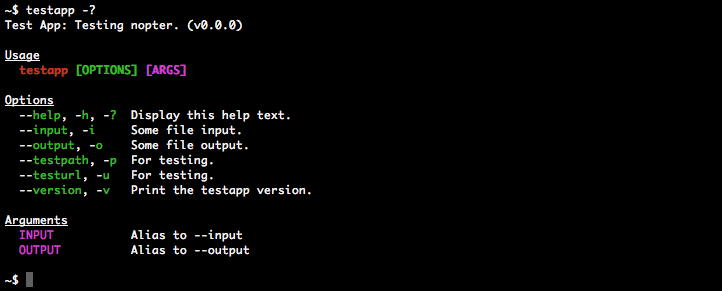 Via the
 help() function.
Testing
// app-cli.js ::::::::::::::::::::

var nopter = require("nopter");

function cli() {
	this.nopter = new nopter();
	this.nopter.config({/* See above example */});
}

cli.prototype.input = function(args, showArgs) {
	var testing = !!args;
	args = this.nopter.input(args);
	if (testing && showArgs) return args;
	if (args.compression) console.log("Compression :: "+args.compression);
	if (args.input) console.log("Input File :: "+args.input);
};

module.exports = cli;

// test.js ::::::::::::::::::::

var appCLI = require("./app-cli.js");
var nopter = require("nopter");

nopter.util.forceColors();

function test1() {
	var cli = new appCLI();
	var options = cli.input("--input file1 --compression 100", true);
	assert.equal(options.input, "path/to/file1");
	assert.deepEqual(options, {compression:100, input:"path/to/file1"});
}

function test2() {
	var cli = new appCLI();
	var helpScreen = nopter.util.readHelpFile("./help.txt");
	helpScreen = nopter.util.replaceColorVars(helpScreen);
	assert.equal( cli.input("--help"), helpScreen );
}
For more ideas, check out the test suite.
Documentation
Methods
config(object)
Gets or sets the configuration.
config.merge(object)
Merges a new configuration with the existing one.
error.fatal(error, additional, prefix)
Gets a (red) colored error message with a default "Error" prefix, but does not display/log it.
error can be an Error or String. If an Error, error.name will override the default prefix.additional [optional] is a second, uncolored String sentence.prefix [optional] overrides the default prefix.
error.notice(error, additional, prefix)
Gets an uncolored error message with a default "Notice" prefix, but does not display/log it.
See error.fatal for arguments info.
error.warn(error, additional, prefix)
Gets a (yellow) colored error message with a default "Warning" prefix, but does not display/log it.
See error.fatal for arguments info.
help()
Gets the help screen, but does not display/log it.
help.indent()
Gets the indent value for custom additions to the help screen.
Gets user input parsed by nopt.
nopter.input();
nopter.input(process.argv, 2);	// same as above

nopter.input("app --option value", 1);
nopter.input(["--option","value"]);
args [optional] can be an Array or String. Default value is process.argv.slice [optional] is a Number. See nopt docs. Unlike nopt, the default value of 2 only applies when args===process.argv; otherwise the default value is 0.
util.forceColors(value)
Forces colors in situations where they would normally be disabled such as a child_process and some CI (Continuous Integration) systems. Due to the singleton design of the color library, this value applies to all nopter instances. Colors are not forced by default.
value [optional] is a Boolean. If undefined, it will default to true.
util.readHelpFile(filepath)
Synchronously reads the contents of a text file and converts to LF line endings for cross-platform support. Useful in testing the output of help().
console.log( nopter.util.readHelpFile("path/to/file.txt") );
//-> This is a text file.
filepath is a required String path, relative to the current module (like require("./")).
Replace easy-to-read variables in a String with their ANSI counterparts. Useful in testing the output of help().
var str = "{{green}}This is a {{bold}}colored{{/bold}} sentence.{{/green}}";
console.log( nopter.util.replaceColorVars(str) );
//-> \u001b[32mThis is a \u001b[1mcolored\u001b[22m sentence.\u001b[39m
Remove all ANSI characters. Useful in testing the output of help().
var str = "\u001b[32mThis is a \u001b[1mcolored\u001b[22m sentence.\u001b[39m";
console.log( nopter.util.stripColors(str) );
//-> This is a colored sentence.
str is a required String.
Configuration
config.colors
Type: Array
Default value: ["red","green","magenta"]
The colors used in the help screen. Possible color values, [null,…] to disable a color and null to disable all colors.
config.description
Type: String
Default value: ""
The app description.
config.name
Type: String
Default value: "noname"
The app name used in the command line.
config.title
Type: String
Default value: config.name.toUpperCase()
The app title, which is sometimes slightly different from config.name.
config.version
Type: String
Default value: "0.0.0"
The app version.
config.options
Type: Object
Default value: {}
The command line options.
options: {
	"option-name": {
		short: "o",
		info: "Description of option.",
		type: String
	}
}
option.default can be any value that is applied when no user value has been supplied.option.hidden is a Boolean that hides the option from the help screen.option.info is a descriptive String used in the help screen.option.rename can be a String or Boolean. false will disable auto camel-casing. The default value is true.option.short can be a String or Array.option.sort is a String for categorizing the help screen.option.type can be any of these types. The default type is String.
config.aliases
Type: Array
Default value: []
Argument shortcuts to options.
aliases: ["option1","option2"]
This would allow something like app foo bar to be a CLI shortcut to app --option1 foo --option2 bar.
Roadmap Features
- add
"safe colors", cell-span and word-wrap features to cli-table
- add "before" and "after" (table?) content for
help()
- add
option.alias shortcut:
"option": {
	alias: "--option1 value -xyz"
}
- add
config.commands for nested options:
commands: {
	"command": {
		info: "A command with specific options.",
		options: {
			"input": {
				info: "The input file."
				type: path
			},
			"output": {
				info: "The output file."
				type: path
			}
		},
		aliases: ["input","output"]
	}
}

//$ app command input.ext output.ext
- rename
options.aliases to options.arguments?
- add
util.shell() for easier project testing?
Release History
- 0.3.0
- added option auto camel-casing;
option.rename supports booleans
- added
input()._remain
option.info no longer requires a valueoption.type defaults to type String
- 0.2.1 fixed bug with
util.forceColors(false)
- 0.2.0
- added
input(args), util.forceColors(), util.readHelpFile(), util.replaceColorVars(), util.stripColors() for easier project testing
- added support for multiple instances (no singleton)
- 0.1.9 avoided
String.prototype colors
- 0.1.8 simplified color test
- 0.1.7 added
config.colors, config.merge(), help.indent()
- 0.1.6 tested on Windows
- 0.1.5 added
option.sort
- 0.1.4 added
option.rename
- 0.1.3 added
option.hidden
- 0.1.2 added
option.default, help screen cleanup
- 0.1.1 added custom error messages
- 0.1.0 initial release
