vanilla-jsoneditor

A web-based tool to view, edit, format, transform, and validate JSON

ISC 141 个版本
安装
npm install vanilla-jsoneditor
yarn add vanilla-jsoneditor
pnpm add vanilla-jsoneditor
bun add vanilla-jsoneditor
README

vanilla-jsoneditor

A web-based tool to view, edit, format, transform, and validate JSON.

Try it out: https://jsoneditoronline.org

This is the vanilla variant of svelte-jsoneditor, which can be used in vanilla JavaScript or frameworks like SolidJS, React, Vue, Angular.

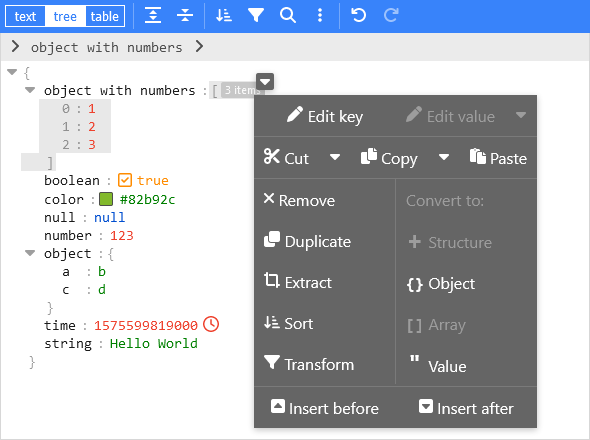
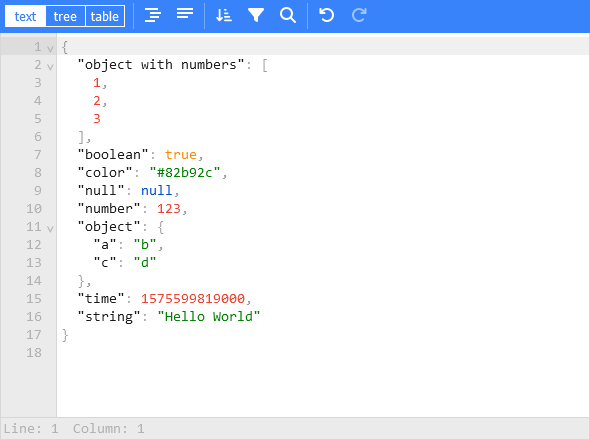
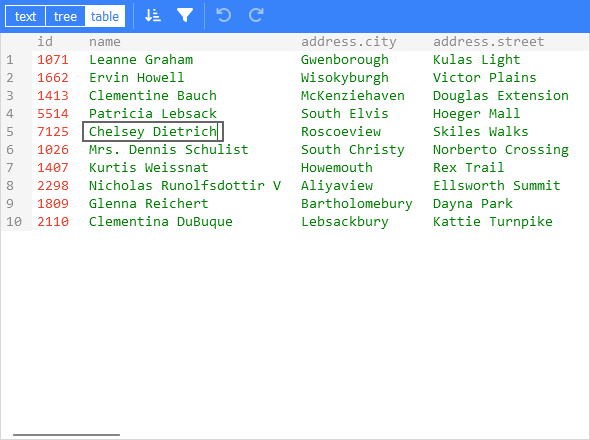
JSONEditor tree mode screenshot JSONEditor text mode screenshot JSONEditor table mode screenshot

Features

  • View and edit JSON
  • Has a low level text editor and high level tree view and table view
  • Format (beautify) and compact JSON
  • Sort, query, filter, and transform JSON
  • Repair JSON
  • JSON schema validation and pluggable custom validation
  • Color highlighting, undo/redo, search and replace
  • Utilities like a color picker and timestamp tag
  • Handles large JSON documents up to 512 MB

Install

Install using npm:

npm install vanilla-jsoneditor

Remark: for usage in a Svelte project, install and use svelte-jsoneditor instead of vanilla-jsoneditor.

Use

If you have a setup for your project with a bundler (like Vite, Rollup, or Webpack), it is best to use the default ES import:

// for use in a React, Vue, or Angular project
import { createJSONEditor } from 'vanilla-jsoneditor'

If you want to use the library straight in the browser, use the provided standalone ES bundle:

// for use directly in the browser
import { createJSONEditor } from 'vanilla-jsoneditor/standalone.js'

The standalone bundle contains all dependencies of vanilla-jsoneditor, for example lodash-es and Ajv. If you use some of these dependencies in your project too, it means that they will be bundled twice in your web application, leading to a needlessly large application size. In general, it is preferable to use the default import { createJSONEditor } from 'vanilla-jsoneditor' so dependencies can be reused.

Use (Browser example loading the ES module)

<!doctype html>
<html lang="en">
  <head>
    <title>JSONEditor</title>
  </head>
  <body>
    <div id="jsoneditor"></div>

    <script type="module">
      import { createJSONEditor } from 'vanilla-jsoneditor/standalone.js'

      // Or use it through a CDN (not recommended for use in production):
      // import { createJSONEditor } from 'https://unpkg.com/vanilla-jsoneditor/index.js'
      // import { createJSONEditor } from 'https://cdn.jsdelivr.net/npm/vanilla-jsoneditor/index.js'

      let content = {
        text: undefined,
        json: {
          greeting: 'Hello World'
        }
      }

      const editor = createJSONEditor({
        target: document.getElementById('jsoneditor'),
        props: {
          content,
          onChange: (updatedContent, previousContent, { contentErrors, patchResult }) => {
            // content is an object { json: JSONData } | { text: string }
            console.log('onChange', { updatedContent, previousContent, contentErrors, patchResult })
            content = updatedContent
          }
        }
      })

      // use methods get, set, update, and onChange to get data in or out of the editor.
      // Use updateProps to update properties.
    </script>
  </body>
</html>

Use (React example, including NextJS)

First, create a React component to wrap the vanilla-jsoneditor

Depending on whether you are using JavaScript of TypeScript, create either a JSX or TSX file:

TypeScript

//
// JSONEditorReact.tsx
//
import { useEffect, useRef } from 'react'
import { createJSONEditor, JSONEditorPropsOptional } from 'vanilla-jsoneditor'

const JSONEditorReact: React.FC<JSONEditorPropsOptional> = (props) => {
  const refContainer = useRef<HTMLDivElement>(null)
  const refEditor = useRef<JSONEditor | null>(null)

  useEffect(() => {
    // create editor
    refEditor.current = createJSONEditor({
      target: refContainer.current!,
      props: {}
    })

    return () => {
      // destroy editor
      if (refEditor.current) {
        refEditor.current.destroy()
        refEditor.current = null
      }
    }
  }, [])

  useEffect(() => {
    // update props
    if (refEditor.current) {
      refEditor.current.updateProps(props)
    }
  }, [props])

  return <div ref={refContainer}></div>
}

export default JSONEditorReact

JavaScript

//
// JSONEditorReact.jsx
//
import { useEffect, useRef } from 'react'
import { JSONEditor, JSONEditorPropsOptional } from 'vanilla-jsoneditor'

const JSONEditorReact = (props) => {
  const refContainer = useRef(null)
  const refEditor = useRef(null)

  useEffect(() => {
    // create editor
    refEditor.current = createJSONEditor({
      target: refContainer.current,
      props: {}
    })

    return () => {
      // destroy editor
      if (refEditor.current) {
        refEditor.current.destroy()
        refEditor.current = null
      }
    }
  }, [])

  // update props
  useEffect(() => {
    if (refEditor.current) {
      refEditor.current.updateProps(props)
    }
  }, [props])

  return <div ref={refContainer}></div>
}

export default JSONEditorReact

Import and use the React component

If you are using NextJS, you will need to use a dynamic import to only render the component in the browser (disabling server-side rendering of the wrapper), as shown below in a NextJS TypeScript example.

If you are using React in an conventional non-NextJS browser app, you can import the component using a standard import statement like import JSONEditorReact from '../JSONEditorReact'

//
// demo.tsx for use with NextJS
//
import dynamic from 'next/dynamic'
import { useCallback, useState } from 'react'

//
// In NextJS, when using TypeScript, type definitions
// can be imported from 'vanilla-jsoneditor' using a
// conventional import statement (prefixed with 'type',
// as shown below), but only types can be imported this
// way. When using NextJS, React components and helper
// functions must be imported dynamically using { ssr: false }
// as shown elsewhere in this example.
//
import type { Content, OnChangeStatus } from 'vanilla-jsoneditor'

//
// In NextJS, the JSONEditor component must be wrapped in
// a component that is dynamically in order to turn off
// server-side rendering of the component. This is neccessary
// because the vanilla-jsoneditor code attempts to use
// browser-only JavaScript capabilities not available
// during server-side rendering. Any helper functions
// provided by vanilla-jsoneditor, such as toTextContent,
// must also only be used in dynamically imported,
// ssr: false components when using NextJS.
//
const JSONEditorReact = dynamic(() => import('../JSONEditorReact'), { ssr: false })
const TextContent = dynamic(() => import('../TextContent'), { ssr: false })

const initialContent = {
  hello: 'world',
  count: 1,
  foo: ['bar', 'car']
}

export default function Demo() {
  const [jsonContent, setJsonContent] = useState<Content>({ json: initialContent })
  const handler = useCallback(
    (content: Content, previousContent: Content, status: OnChangeStatus) => {
      setJsonContent(content)
    },
    [jsonContent]
  )

  return (
    <div>
      <JSONEditorReact content={jsonContent} onChange={handler} />
      <TextContent content={jsonContent} />
    </div>
  )
}
//
// TextContent.tsx
//
// (wrapper around toTextContent for use with NextJS)
//
import { Content, toTextContent } from 'vanilla-jsoneditor'

interface IOwnProps {
  content: Content
}
const TextContent = (props: IOwnProps) => {
  const { content } = props

  return (
    <p>
      The contents of the editor, converted to a text string, are: {toTextContent(content).text}
    </p>
  )
}

export default TextContent
版本列表
3.12.0 2026-03-30
3.11.0 2025-12-10
3.10.0 2025-09-24
3.9.0 2025-09-13
3.8.0 2025-07-24
3.7.0 2025-07-11
3.6.1 2025-06-24
3.6.0 2025-06-18
3.5.0 2025-05-23
3.4.0 2025-05-23
3.3.1 2025-04-02
3.3.0 2025-03-28
3.2.0 2025-03-26
3.1.1 2025-03-19
3.1.0 2025-03-12
3.0.0 2025-02-28
2.4.0 2025-02-13
2.3.3 2024-12-11
2.3.2 2024-12-05
2.3.1 2024-11-27
2.3.0 2024-11-27
2.2.1 2024-11-27
2.2.0 2024-11-26
2.1.0 2024-11-20
2.0.2 2024-11-05
2.0.1 2024-11-01
2.0.0 2024-10-28
1.1.2 2024-10-25
1.1.1 2024-10-22
1.1.0 2024-10-22
1.0.8 2024-10-14
1.0.7 2024-10-09
1.0.6 2024-09-30
1.0.5 2024-09-30
1.0.4 2024-09-27
1.0.3 2024-09-26
1.0.2 2024-09-26
1.0.1 2024-09-25
1.0.0 2024-09-24
0.23.8 2024-07-26
0.23.7 2024-06-06
0.23.6 2024-06-05
0.23.5 2024-05-30
0.23.4 2024-05-09
0.23.3 2024-05-06
0.23.2 2024-04-17
0.23.1 2024-03-28
0.23.0 2024-03-13
0.22.0 2024-03-01
0.21.6 2024-02-15
0.21.5 2024-02-05
0.21.4 2024-01-24
0.21.3 2024-01-19
0.21.2 2024-01-10
0.21.1 2023-12-20
0.21.0 2023-12-20
0.20.0 2023-12-06
0.19.0 2023-11-21
0.18.13 2023-11-13
0.18.12 2023-11-08
0.18.11 2023-10-31
0.18.10 2023-10-17
0.18.9 2023-10-11
0.18.8 2023-10-02
0.18.7 2023-09-28
0.18.6 2023-09-27
0.18.5 2023-09-27
0.18.4 2023-09-19
0.18.3 2023-08-30
0.18.2 2023-08-25
0.18.1 2023-08-25
0.18.0 2023-08-21
0.17.10 2023-08-16
0.17.9 2023-08-14
0.17.8 2023-06-21
0.17.7 2023-06-13
0.17.6 2023-06-12
0.17.5 2023-06-08
0.17.4 2023-05-18
0.17.3 2023-05-05
0.17.2 2023-05-03
0.17.1 2023-04-17
0.17.0 2023-04-17
0.16.1 2023-03-24
0.16.0 2023-03-15
0.15.1 2023-03-01
0.15.0 2023-03-01
0.14.10 2023-02-24
0.14.9 2023-02-22
0.14.8 2023-02-22
0.14.7 2023-02-22
0.14.6 2023-02-22
0.14.5 2023-02-15
0.14.4 2023-02-03
0.14.3 2023-01-27
0.14.2 2023-01-26
0.14.1 2023-01-26
0.14.0 2023-01-20
0.13.1 2023-01-20
0.13.0 2023-01-20
0.12.0 2023-01-18
0.11.8 2023-01-07
0.11.6 2023-01-07
0.11.5 2022-12-20
0.11.4 2022-12-14
0.11.3 2022-12-13
0.11.2 2022-12-09
0.11.1 2022-12-07
0.11.0-beta.3 2022-12-06
0.11.0-beta.2 2022-12-05
0.11.0-beta.1 2022-12-02
0.11.0 2022-12-07
0.10.4 2022-12-05
0.10.2 2022-11-17
0.10.1 2022-11-10
0.10.0 2022-11-10
0.9.2 2022-11-04
0.9.1 2022-11-02
0.9.0 2022-10-25
0.8.0 2022-10-24
0.7.11 2022-10-18
0.7.10 2022-10-13
0.7.9 2022-09-30
0.7.8 2022-09-29
0.7.7 2022-09-29
0.7.6 2022-09-28
0.7.5 2022-09-21
0.7.4 2022-09-12
0.7.3 2022-09-09
0.7.2 2022-09-09
0.7.1 2022-09-05
0.7.0 2022-09-01
0.6.6 2022-08-29
0.6.5 2022-08-29
0.6.4 2022-08-19
0.6.3 2022-08-16
0.6.2 2022-07-28
0.6.1 2022-07-28
0.6.0 2022-07-28
0.5.0 2022-07-11
0.4.0 2022-07-08