clearml

ClearML - Auto-Magical Experiment Manager, Version Control, and MLOps for AI

Apache License 2.0 196 个版本
ClearML <support@clear.ml>
安装
pip install clearml
poetry add clearml
pipenv install clearml
conda install clearml
描述

ClearML - Auto-Magical Suite of tools to streamline your AI workflow
Experiment Manager, MLOps/LLMOps and Data-Management

GitHub license PyPI pyversions PyPI version shields.io Conda version shields.io Optuna
PyPI Downloads Artifact Hub Youtube Slack Channel Signup

🌟 ClearML is open-source - Leave a star to support the project! 🌟


ClearML

ClearML is a ML/DL development and production suite. It contains FIVE main modules:

  • Experiment Manager - Automagical experiment tracking, environments and results
  • MLOps / LLMOps - Orchestration, Automation & Pipelines solution for ML/DL/GenAI jobs (Kubernetes / Cloud / bare-metal)
  • Data-Management - Fully differentiable data management & version control solution on top of object-storage (S3 / GS / Azure / NAS)
  • Model-Serving - cloud-ready Scalable model serving solution!
    • Deploy new model endpoints in under 5 minutes
    • Includes optimized GPU serving support backed by Nvidia-Triton
    • with out-of-the-box Model Monitoring
  • Reports - Create and share rich MarkDown documents supporting embeddable online content
  • :fire: Orchestration Dashboard - Live rich dashboard for your entire compute cluster (Cloud / Kubernetes / On-Prem)
  • 🔥 💥 Fractional GPUs - Container based, driver level GPU memory limitation 🙀 !!!

Instrumenting these components is the ClearML-server, see Self-Hosting & Free tier Hosting


Sign up & Start using in under 2 minutes


Friendly tutorials to get you started

Step 1 - Experiment Management Open In Colab
Step 2 - Remote Execution Agent Setup Open In Colab
Step 3 - Remotely Execute Tasks Open In Colab

Experiment Management Datasets
Orchestration Pipelines

ClearML Experiment Manager

Adding only 2 lines to your code gets you the following

  • Complete experiment setup log
    • Full source control info, including non-committed local changes
    • Execution environment (including specific packages & versions)
    • Hyper-parameters
      • argparse/Click/PythonFire for command line parameters with currently used values
      • Explicit parameters dictionary
      • Tensorflow Defines (absl-py)
      • Hydra configuration and overrides
    • Initial model weights file
  • Full experiment output automatic capture
    • stdout and stderr
    • Resource Monitoring (CPU/GPU utilization, temperature, IO, network, etc.)
    • Model snapshots (With optional automatic upload to central storage: Shared folder, S3, GS, Azure, Http)
    • Artifacts log & store (Shared folder, S3, GS, Azure, Http)
    • Tensorboard/TensorboardX scalars, metrics, histograms, images, audio and video samples
    • Matplotlib & Seaborn
    • ClearML Logger interface for complete flexibility.
  • Extensive platform support and integrations

Start using ClearML

  1. Sign up for free to the ClearML Hosted Service (alternatively, you can set up your own server, see here).

    ClearML Demo Server: ClearML no longer uses the demo server by default. To enable the demo server, set the CLEARML_NO_DEFAULT_SERVER=0 environment variable. Credentials aren't needed, but experiments launched to the demo server are public, so make sure not to launch sensitive experiments if using the demo server.

  2. Install the clearml python package:

    pip install clearml
    
  3. Connect the ClearML SDK to the server by creating credentials, then execute the command below and follow the instructions:

    clearml-init
    
  4. Add two lines to your code:

    from clearml import Task
    task = Task.init(project_name='examples', task_name='hello world')
    

And you are done! Everything your process outputs is now automagically logged into ClearML.

Next step, automation! Learn more about ClearML's two-click automation here.

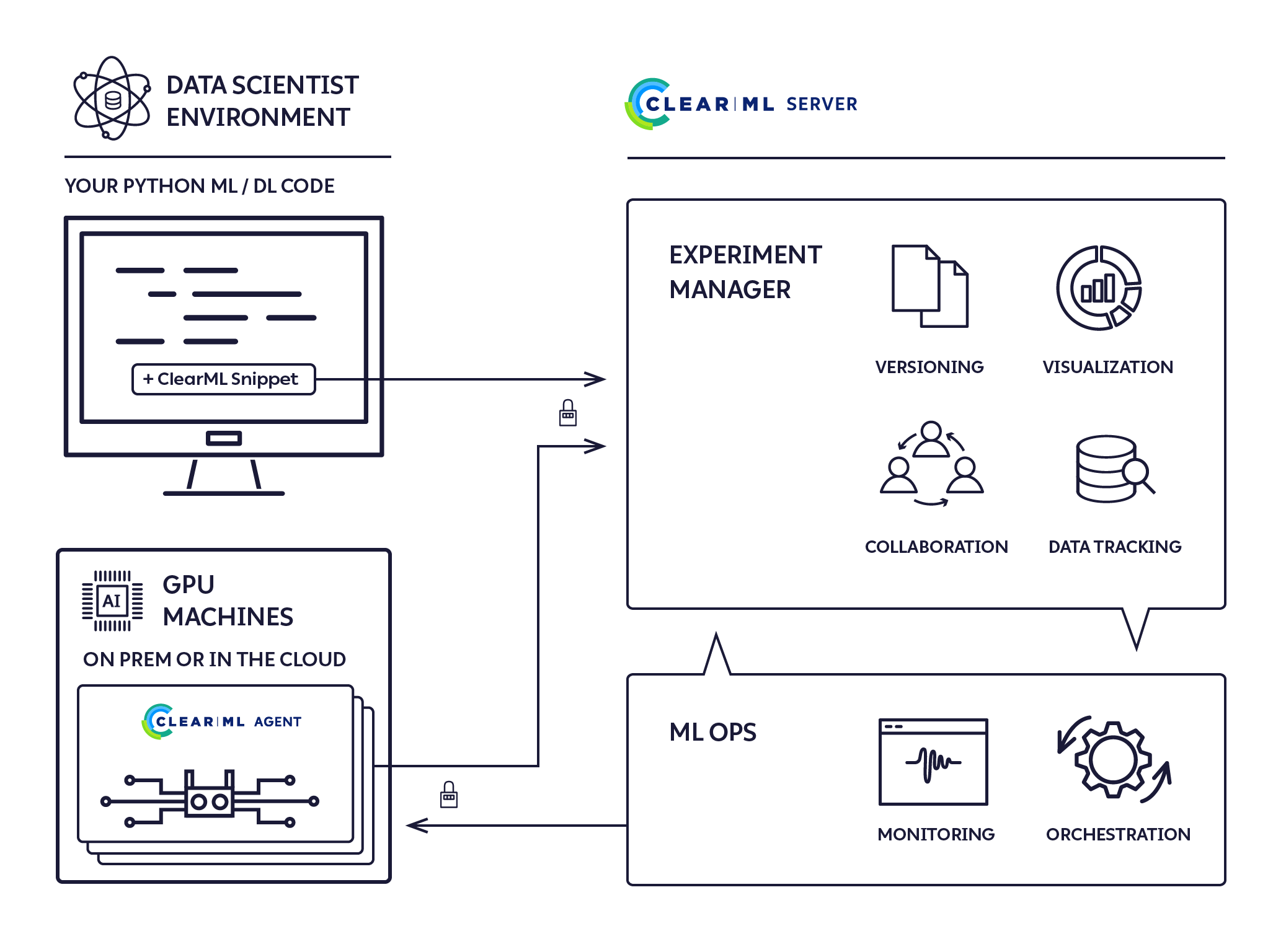
ClearML Architecture

The ClearML run-time components:

  • The ClearML Python Package - for integrating ClearML into your existing scripts by adding just two lines of code, and optionally extending your experiments and other workflows with ClearML's powerful and versatile set of classes and methods.
  • The ClearML Server - for storing experiment, model, and workflow data; supporting the Web UI experiment manager and MLOps automation for reproducibility and tuning. It is available as a hosted service and open source for you to deploy your own ClearML Server.
  • The ClearML Agent - for MLOps orchestration, experiment and workflow reproducibility, and scalability.
clearml-architecture

Additional Modules

  • clearml-session - Launch remote JupyterLab / VSCode-server inside any docker, on Cloud/On-Prem machines
  • clearml-task - Run any codebase on remote machines with full remote logging of Tensorboard, Matplotlib & Console outputs
  • clearml-data - CLI for managing and versioning your datasets, including creating / uploading / downloading of data from S3/GS/Azure/NAS
  • AWS Auto-Scaler - Automatically spin EC2 instances based on your workloads with preconfigured budget! No need for AKE!
  • Hyper-Parameter Optimization - Optimize any code with black-box approach and state-of-the-art Bayesian optimization algorithms
  • Automation Pipeline - Build pipelines based on existing experiments / jobs, supports building pipelines of pipelines!
  • Slack Integration - Report experiments progress / failure directly to Slack (fully customizable!)

Why ClearML?

ClearML is our solution to a problem we share with countless other researchers and developers in the machine learning/deep learning universe: Training production-grade deep learning models is a glorious but messy process. ClearML tracks and controls the process by associating code version control, research projects, performance metrics, and model provenance.

We designed ClearML specifically to require effortless integration so that teams can preserve their existing methods and practices.

  • Use it on a daily basis to boost collaboration and visibility in your team
  • Create a remote job from any experiment with a click of a button
  • Automate processes and create pipelines to collect your experimentation logs, outputs, and data
  • Store all your data on any object-storage solution, with the most straightforward interface possible
  • Make your data transparent by cataloging it all on the ClearML platform

We believe ClearML is ground-breaking. We wish to establish new standards of true seamless integration between experiment management, MLOps, and data management.

Who We Are

ClearML is supported by you and the clear.ml team, which helps enterprise companies build scalable MLOps.

We built ClearML to track and control the glorious but messy process of training production-grade deep learning models. We are committed to vigorously supporting and expanding the capabilities of ClearML.

We promise to always be backwardly compatible, making sure all your logs, data, and pipelines will always upgrade with you.

License

Apache License, Version 2.0 (see the LICENSE for more information)

If ClearML is part of your development process / project / publication, please cite us :heart: :

@misc{clearml,
title = {ClearML - Your entire MLOps stack in one open-source tool},
year = {2024},
note = {Software available from http://github.com/clearml/clearml},
url={https://clear.ml/},
author = {ClearML},
}

Documentation, Community & Support

For more information, see the official documentation and on YouTube.

For examples and use cases, check the examples folder and corresponding documentation.

If you have any questions: post on our Slack Channel, or tag your questions on stackoverflow with 'clearml' tag.

For feature requests or bug reports, please use GitHub issues.

Additionally, you can always find us at info@clear.ml

Contributing

PRs are always welcome :heart: See more details in the ClearML Guidelines for Contributing.

May the force (and the goddess of learning rates) be with you!

版本列表
2.1.9 2026-06-18
2.1.8 2026-05-31
2.1.7 2026-05-12
2.1.6 2026-05-01
2.1.5 2026-03-24
2.1.4 2026-03-23
2.1.3 2026-01-25
2.1.2 2026-01-09
2.1.1 2025-12-29
2.1.0 2025-12-24
2.1.6rc0 2026-03-31
2.1.4rc1 2026-03-10
2.1.4rc0 2026-02-25
2.1.1rc0 2025-12-11
2.0.2 2025-07-10
2.0.1 2025-06-26
2.0.0 2025-05-22
2.0.3rc1 2025-10-22
2.0.3rc0 2025-07-24
2.0.0rc1 2025-05-21
2.0.0rc0 2025-04-20
1.18.0 2025-03-09
1.17.1 2025-01-19
1.17.0 2024-12-18
1.17.2rc0 2025-02-05
1.17.0rc0 2024-12-07
1.16.5 2024-10-27
1.16.4 2024-08-27
1.16.3 2024-08-06
1.16.2 2024-06-19
1.16.1 2024-05-17
1.16.0 2024-05-17
1.16.5rc2 2024-10-01
1.16.5rc1 2024-09-23
1.16.5rc0 2024-09-11
1.16.3rc2 2024-07-10
1.16.3rc1 2024-07-02
1.16.3rc0 2024-07-02
1.16.2rc0 2024-05-21
1.16.0rc0 2024-05-08
1.15.1 2024-04-09
1.15.0 2024-04-01
1.14.4 2024-02-21
1.14.3 2024-02-12
1.14.2 2024-02-07
1.14.1 2024-01-10
1.14.0 2024-01-10
1.14.5rc0 2024-03-03
1.14.4rc1 2024-02-15
1.14.4rc0 2024-02-12
1.14.3rc0 2024-02-09
1.14.2rc0 2024-01-18
1.14.1rc0 2024-01-10
1.14.0rc0 2024-01-06
1.13.2 2023-11-08
1.13.1 2023-09-25
1.13.0 2023-09-22
1.13.3rc1 2024-01-03
1.13.3rc0 2023-12-13
1.13.2rc3 2023-11-05
1.13.2rc2 2023-10-26
1.13.2rc1 2023-10-23
1.13.2rc0 2023-10-14
1.12.2 2023-08-11
1.12.1 2023-08-01
1.12.0 2023-07-21
1.12.2rc0 2023-08-04
1.12.1rc0 2023-07-24
1.11.1 2023-06-22
1.11.0 2023-05-27
1.11.2rc0 2023-07-10
1.11.1rc2 2023-06-12
1.11.1rc1 2023-05-31
1.11.1rc0 2023-05-31
1.11.0rc0 2023-05-30
1.10.4 2023-05-09
1.10.3 2023-04-06
1.10.2 2023-04-04
1.10.1 2023-03-29
1.10.0 2023-03-24
1.10.4rc1 2023-04-27
1.10.4rc0 2023-04-23
1.10.0rc0 2023-03-10
1.9.3 2023-03-08
1.9.2 2023-03-01
1.9.1 2023-01-24
1.9.0 2022-12-23
1.9.2rc2 2023-02-16
1.9.2rc1 2023-02-07
1.9.2rc0 2023-01-25
1.9.1rc0 2022-12-25
1.8.3 2022-12-04
1.8.2 2022-12-01
1.8.1 2022-11-21
1.8.0 2022-11-14
1.8.4rc2 2022-12-19
1.8.4rc1 2022-12-13
1.8.4rc0 2022-12-07
1.8.1rc0 2022-11-16
1.7.2 2022-10-23
1.7.1 2022-09-30
1.7.0 2022-09-15
1.7.3rc1 2022-11-04
1.7.3rc0 2022-10-28
1.7.2rc2 2022-10-14
1.7.2rc1 2022-10-11
1.7.2rc0 2022-10-06
1.7.1rc2 2022-09-23
1.7.1rc1 2022-09-22
1.7.1rc0 2022-09-18
1.7.0rc1 2022-09-11
1.7.0rc0 2022-09-07
1.6.4 2022-08-10
1.6.3 2022-08-09
1.6.2 2022-07-04
1.6.1 2022-06-30
1.6.0 2022-06-29
1.6.5rc2 2022-08-22
1.6.5rc1 2022-08-20
1.6.5rc0 2022-08-11
1.6.3rc1 2022-07-21
1.6.3rc0 2022-07-15
1.6.2rc0 2022-07-02
1.5.0 2022-06-16
1.4.1 2022-05-17
1.4.0 2022-05-05
1.4.2rc1 2022-06-06
1.4.2rc0 2022-05-24
1.4.1rc0 2022-05-12
1.3.2 2022-03-29
1.3.1 2022-03-17
1.3.0 2022-03-06
1.3.3rc2 2022-04-26
1.3.3rc1 2022-04-13
1.3.3rc0 2022-03-30
1.3.2rc4 2022-03-27
1.3.2rc3 2022-03-24
1.3.2rc2 2022-03-24
1.3.2rc1 2022-03-23
1.3.2rc0 2022-03-21
1.3.1rc0 2022-03-11
1.3.0rc2 2022-03-02
1.3.0rc1 2022-03-01
1.3.0rc0 2022-02-28
1.2.1 2022-03-02
1.2.0 2022-02-26
1.2.1rc0 2022-03-01
1.2.0rc2 2022-02-24
1.2.0rc1 2022-02-16
1.2.0rc0 2022-02-07
1.1.6 2022-01-18
1.1.5 2022-01-01
1.1.4 2021-11-08
1.1.3 2021-10-25
1.1.2 2021-10-07
1.1.1 2021-09-20
1.1.0 2021-09-19
1.1.6rc0 2022-01-08
1.1.5rc7 2021-12-30
1.1.5rc6 2021-12-26
1.1.5rc5 2021-12-22
1.1.5rc4 2021-12-12
1.1.5rc3 2021-12-04
1.1.5rc2 2021-11-28
1.1.5rc1 2021-11-26
1.1.5rc0 2021-11-18
1.1.4rc0 2021-10-27
1.1.3rc0 2021-10-07
1.1.2rc0 2021-10-03
1.0.5 2021-08-05
1.0.4 2021-06-22
1.0.3 2021-05-31
1.0.2 2021-05-05
1.0.1 2021-05-04
1.0.0 2021-05-03
1.0.6rc2 2021-09-02
1.0.6rc1 2021-08-31
1.0.4rc1 2021-06-12
1.0.4rc0 2021-05-31
1.0.3rc1 2021-05-20
1.0.3rc0 2021-05-16
1.0.2rc0 2021-05-05
0.17.5 2021-03-16
0.17.4 2021-01-13
0.17.3 2021-01-11
0.17.2 2020-12-25
0.17.1 2020-12-22
0.17.0 2020-12-22
0.17.6rc1 2021-04-11
0.17.5rc6 2021-03-11
0.17.5rc5 2021-02-23
0.17.5rc4 2021-02-14
0.17.5rc3 2021-02-04
0.17.5rc2 2021-01-24
0.17.5rc1 2021-01-23
0.17.5rc0 2021-01-18