gget

Efficient querying of genomic databases.

57 个版本 Python >=3.12
安装
pip install gget
poetry add gget
pipenv install gget
conda install gget
描述

gget

pypi version Downloads Conda license tests coverage Powered by NumFOCUS

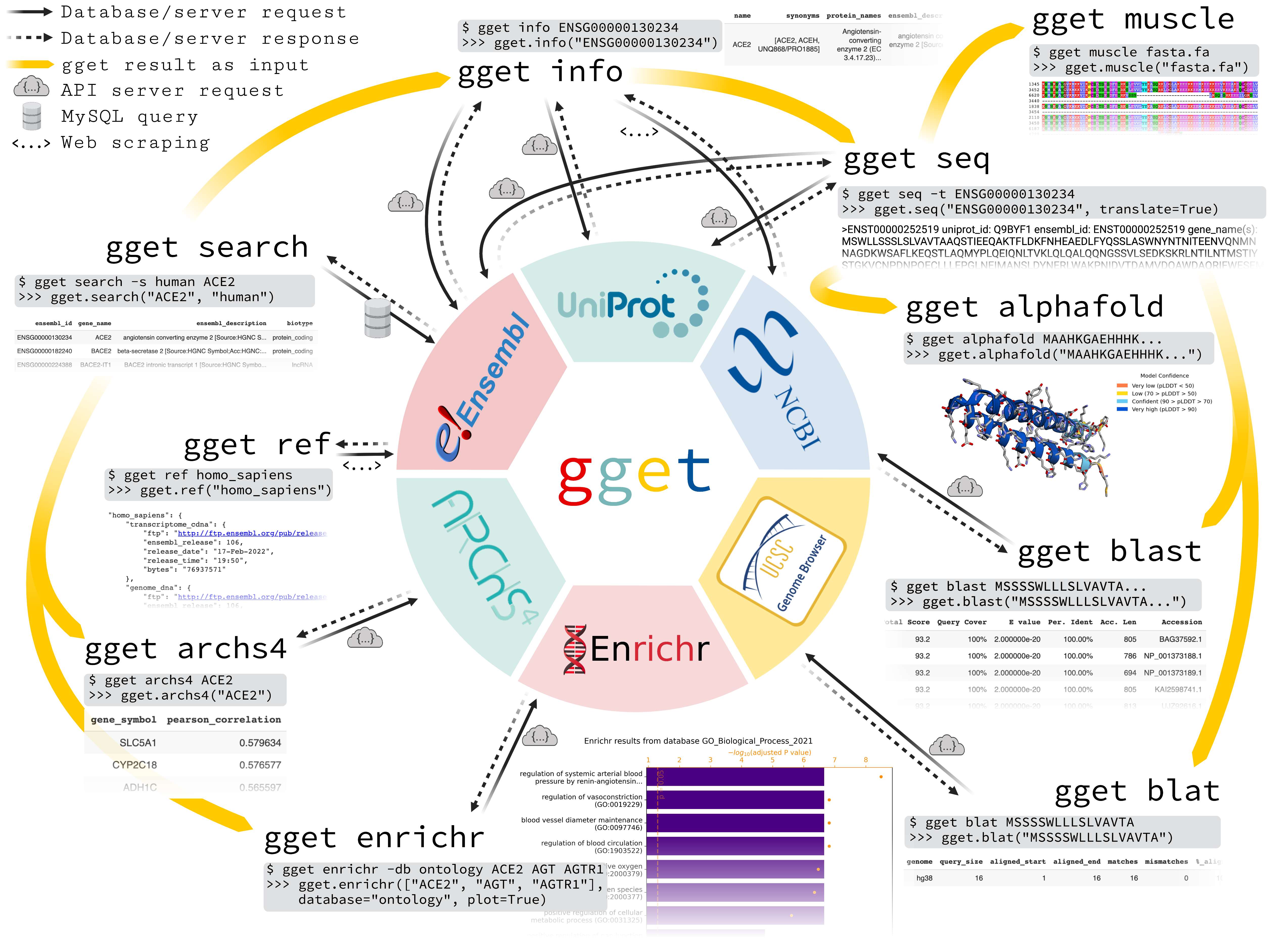
gget is a free, open-source command-line tool and Python package that enables efficient querying of genomic databases. gget consists of a collection of separate but interoperable modules, each designed to facilitate one type of database querying in a single line of code. gget was developed by Laura Luebbert in the Pachter Lab.

gget is part of the scverse® project and is fiscally sponsored by NumFOCUS. If you like gget and want to support our mission, please consider making a tax-deductible donation.

alt text

If you use gget in a publication, please cite*:

Luebbert, L., & Pachter, L. (2023). Efficient querying of genomic reference databases with gget. Bioinformatics. https://doi.org/10.1093/bioinformatics/btac836

Read the article here: https://doi.org/10.1093/bioinformatics/btac836

Installation

uv pip install gget

or

pip install --upgrade gget

Install from source:

git clone https://github.com/scverse/gget.git
cd gget
uv pip install .

For use in Jupyter Lab / Google Colab:

# Python
import gget

🔗 Manual

🪄 Quick start guide

Command line:

# Fetch all Homo sapiens reference and annotation FTPs from the latest Ensembl release
$ gget ref homo_sapiens

# Get Ensembl IDs of human genes with "ace2" or "angiotensin converting enzyme 2" in their name/description
$ gget search -s homo_sapiens 'ace2' 'angiotensin converting enzyme 2'

# Look up gene ENSG00000130234 (ACE2) and its transcript ENST00000252519
$ gget info ENSG00000130234 ENST00000252519

# Fetch the amino acid sequence of the canonical transcript of gene ENSG00000130234
$ gget seq --translate ENSG00000130234

# Quickly find the genomic location of (the start of) that amino acid sequence
$ gget blat MSSSSWLLLSLVAVTAAQSTIEEQAKTFLDKFNHEAEDLFYQSSLAS

# BLAST (the start of) that amino acid sequence
$ gget blast MSSSSWLLLSLVAVTAAQSTIEEQAKTFLDKFNHEAEDLFYQSSLAS

# Align multiple nucleotide or amino acid sequences against each other (also accepts path to FASTA file)  
$ gget muscle MSSSSWLLLSLVAVTAAQSTIEEQAKTFLDKFNHEAEDLFYQSSLAS MSSSSWLLLSLVEVTAAQSTIEQQAKTFLDKFHEAEDLFYQSLLAS

# Align one or more amino acid sequences against a reference (containing one or more sequences) (local BLAST) (also accepts paths to FASTA files)  
$ gget diamond MSSSSWLLLSLVAVTAAQSTIEEQAKTFLDKFNHEAEDLFYQSSLAS -ref MSSSSWLLLSLVEVTAAQSTIEQQAKTFLDKFHEAEDLFYQSLLAS  

# Use Enrichr for an ontology analysis of a list of genes
$ gget enrichr -db ontology ACE2 AGT AGTR1 ACE AGTRAP AGTR2 ACE3P

# Get the human tissue expression of gene ACE2
$ gget archs4 -w tissue ACE2

# Get the protein structure (in PDB format) of ACE2 as stored in the Protein Data Bank (PDB ID returned by gget info)
$ gget pdb 1R42 -o 1R42.pdb

# Download virus genome datasets from NCBI Virus (e.g., Zika virus sequences)
$ gget virus "Zika virus" --host "Homo sapiens" --nuc_completeness complete

# Find Eukaryotic Linear Motifs (ELMs) in a protein sequence
$ gget setup elm # setup only needs to be run once
$ gget elm -o results MSSSSWLLLSLVAVTAAQSTIEEQAKTFLDKFNHEAEDLFYQSSLAS

# Fetch a scRNAseq count matrix (AnnData format) based on specified gene(s), tissue(s), and cell type(s) (default species: human)
$ gget setup cellxgene # setup only needs to be run once
$ gget cellxgene --gene ACE2 SLC5A1 --tissue lung --cell_type 'mucus secreting cell' -o example_adata.h5ad

Python (Jupyter Lab / Google Colab):

import gget
gget.ref("homo_sapiens")
gget.search(["ace2", "angiotensin converting enzyme 2"], "homo_sapiens")
gget.info(["ENSG00000130234", "ENST00000252519"])
gget.seq("ENSG00000130234", translate=True)
gget.blat("MSSSSWLLLSLVAVTAAQSTIEEQAKTFLDKFNHEAEDLFYQSSLAS")
gget.blast("MSSSSWLLLSLVAVTAAQSTIEEQAKTFLDKFNHEAEDLFYQSSLAS")
gget.muscle(["MSSSSWLLLSLVAVTAAQSTIEEQAKTFLDKFNHEAEDLFYQSSLAS", "MSSSSWLLLSLVEVTAAQSTIEQQAKTFLDKFHEAEDLFYQSLLAS"])
gget.diamond("MSSSSWLLLSLVAVTAAQSTIEEQAKTFLDKFNHEAEDLFYQSSLAS", reference="MSSSSWLLLSLVEVTAAQSTIEQQAKTFLDKFHEAEDLFYQSLLAS")
gget.enrichr(["ACE2", "AGT", "AGTR1", "ACE", "AGTRAP", "AGTR2", "ACE3P"], database="ontology", plot=True)
gget.archs4("ACE2", which="tissue")
gget.pdb("1R42", save=True)
gget.virus("Zika virus", host="Homo sapiens", nuc_completeness="complete")

gget.setup("elm") # setup only needs to be run once
ortho_df, regex_df = gget.elm("MSSSSWLLLSLVAVTAAQSTIEEQAKTFLDKFNHEAEDLFYQSSLAS")

gget.setup("cellxgene") # setup only needs to be run once
gget.cellxgene(gene = ["ACE2", "SLC5A1"], tissue = "lung", cell_type = "mucus secreting cell")

Call gget from R using reticulate:

system("pip install gget")
install.packages("reticulate")
library(reticulate)
gget <- import("gget")

gget$ref("homo_sapiens")
gget$search(list("ace2", "angiotensin converting enzyme 2"), "homo_sapiens")
gget$info(list("ENSG00000130234", "ENST00000252519"))
gget$seq("ENSG00000130234", translate=TRUE)
gget$blat("MSSSSWLLLSLVAVTAAQSTIEEQAKTFLDKFNHEAEDLFYQSSLAS")
gget$blast("MSSSSWLLLSLVAVTAAQSTIEEQAKTFLDKFNHEAEDLFYQSSLAS")
gget$muscle(list("MSSSSWLLLSLVAVTAAQSTIEEQAKTFLDKFNHEAEDLFYQSSLAS", "MSSSSWLLLSLVEVTAAQSTIEQQAKTFLDKFHEAEDLFYQSLLAS"), out="out.afa")
gget$diamond("MSSSSWLLLSLVAVTAAQSTIEEQAKTFLDKFNHEAEDLFYQSSLAS", reference="MSSSSWLLLSLVEVTAAQSTIEQQAKTFLDKFHEAEDLFYQSLLAS")
gget$enrichr(list("ACE2", "AGT", "AGTR1", "ACE", "AGTRAP", "AGTR2", "ACE3P"), database="ontology")
gget$archs4("ACE2", which="tissue")
gget$pdb("1R42", save=TRUE)
gget$virus("Zika virus", host="Homo sapiens", nuc_completeness="complete")

More tutorials

scverse_symbol     numfocus     logo-okfn

版本列表
0.30.7 2026-06-22
0.30.6 2026-06-11
0.30.5 2026-05-24
0.30.3 2026-02-27
0.30.2 2026-02-08
0.30.0 2026-01-20
0.29.3 2025-09-11
0.29.2 2025-07-03
0.29.1 2025-04-21
0.29.0 2024-09-26
0.28.6 2024-06-03
0.28.5 2024-05-30
0.28.4 2024-02-01
0.28.3 2024-01-22
0.28.2 2023-11-16
0.28.0 2023-11-12
0.27.9 2023-08-07
0.27.8 2023-07-12
0.27.7 2023-05-16
0.27.6 2023-05-02
0.27.5 2023-04-06
0.27.4 2023-03-19
0.27.3 2023-03-11
0.27.2 2023-01-01
0.27.1 2022-12-30
0.27.0 2022-12-10
0.3.13 2022-11-11
0.3.12 2022-11-10
0.3.11 2022-09-07
0.3.10 2022-09-02
0.3.9 2022-08-25
0.3.8 2022-08-12
0.3.7 2022-08-09
0.3.5 2022-08-06
0.3.4 2022-08-06
0.3.3 2022-08-05
0.3.1 2022-08-05
0.3.0 2022-08-04
0.2.7 2022-07-29
0.2.6 2022-07-08
0.2.5 2022-06-30
0.2.4 2022-06-29
0.2.3 2022-06-27
0.2.2 2022-06-24
0.2.1 2022-06-09
0.2.0 2022-06-08
0.1.2 2022-06-03
0.1.1 2022-05-28
0.1.0 2022-05-25
0.0.24 2022-05-17
0.0.23 2022-05-17
0.0.22 2022-05-10
0.0.17 2022-03-02
0.0.16 2022-03-02
0.0.6 2022-02-26
0.0.5 2022-02-25
0.0.4 2022-02-22