rasterio

Fast and direct raster I/O for use with NumPy

168 个版本 Python >=3.12
安装
pip install rasterio
poetry add rasterio
pipenv install rasterio
conda install rasterio
描述

======== Rasterio

Rasterio reads and writes geospatial raster data.

.. image:: https://github.com/rasterio/rasterio/actions/workflows/tests.yaml/badge.svg :target: https://github.com/rasterio/rasterio/actions/workflows/tests.yaml

.. image:: https://github.com/rasterio/rasterio/actions/workflows/test_gdal_latest.yaml/badge.svg :target: https://github.com/rasterio/rasterio/actions/workflows/test_gdal_latest.yaml

.. image:: https://github.com/rasterio/rasterio/actions/workflows/test_gdal_tags.yaml/badge.svg :target: https://github.com/rasterio/rasterio/actions/workflows/test_gdal_tags.yaml

.. image:: https://img.shields.io/pypi/v/rasterio :target: https://pypi.org/project/rasterio/

Geographic information systems use GeoTIFF and other formats to organize and store gridded, or raster, datasets. Rasterio reads and writes these formats and provides a Python API based on N-D arrays.

Rasterio 1.5+ works with Python >= 3.12, Numpy >= 2, and GDAL >= 3.8. Official binary packages for Linux, macOS, and Windows with most built-in format drivers plus HDF5, netCDF, and OpenJPEG2000 are available on PyPI.

Read the documentation for more details: https://rasterio.readthedocs.io/.

Example

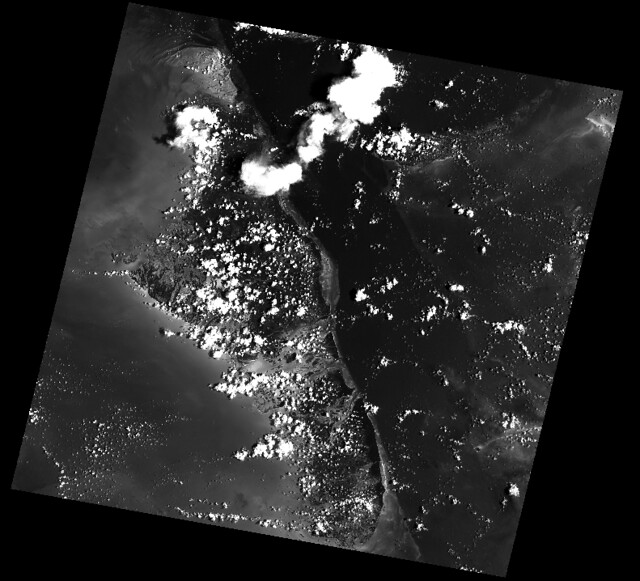
Here's an example of some basic features that Rasterio provides. Three bands are read from an image and averaged to produce something like a panchromatic band. This new band is then written to a new single band TIFF.

.. code-block:: python

import numpy as np
import rasterio

# Read raster bands directly to Numpy arrays.
#
with rasterio.open('tests/data/RGB.byte.tif') as src:
    r, g, b = src.read()

# Combine arrays in place. Expecting that the sum will
# temporarily exceed the 8-bit integer range, initialize it as
# a 64-bit float (the numpy default) array. Adding other
# arrays to it in-place converts those arrays "up" and
# preserves the type of the total array.
total = np.zeros(r.shape)

for band in r, g, b:
    total += band

total /= 3

# Write the product as a raster band to a new 8-bit file. For
# the new file's profile, we start with the meta attributes of
# the source file, but then change the band count to 1, set the
# dtype to uint8, and specify LZW compression.
profile = src.profile
profile.update(dtype=rasterio.uint8, count=1, compress='lzw')

with rasterio.open('example-total.tif', 'w', **profile) as dst:
    dst.write(total.astype(rasterio.uint8), 1)

The output:

.. image:: http://farm6.staticflickr.com/5501/11393054644_74f54484d9_z_d.jpg :width: 640 :height: 581

API Overview

Rasterio gives access to properties of a geospatial raster file.

.. code-block:: python

with rasterio.open('tests/data/RGB.byte.tif') as src:
    print(src.width, src.height)
    print(src.crs)
    print(src.transform)
    print(src.count)
    print(src.indexes)

# Printed:
# (791, 718)
# {u'units': u'm', u'no_defs': True, u'ellps': u'WGS84', u'proj': u'utm', u'zone': 18}
# Affine(300.0379266750948, 0.0, 101985.0,
#        0.0, -300.041782729805, 2826915.0)
# 3
# [1, 2, 3]

A rasterio dataset also provides methods for getting read/write windows (like extended array slices) given georeferenced coordinates.

.. code-block:: python

with rasterio.open('tests/data/RGB.byte.tif') as src:
    window = src.window(*src.bounds)
    print(window)
    print(src.read(window=window).shape)

# Printed:
# Window(col_off=0.0, row_off=0.0, width=791.0000000000002, height=718.0)
# (3, 718, 791)

Rasterio CLI

Rasterio's command line interface, named "rio", is documented at cli.rst <https://github.com/rasterio/rasterio/blob/master/docs/cli.rst>__. Its rio insp command opens the hood of any raster dataset so you can poke around using Python.

.. code-block:: pycon

$ rio insp tests/data/RGB.byte.tif
Rasterio 0.10 Interactive Inspector (Python 3.4.1)
Type "src.meta", "src.read(1)", or "help(src)" for more information.
>>> src.name
'tests/data/RGB.byte.tif'
>>> src.closed
False
>>> src.shape
(718, 791)
>>> src.crs
{'init': 'epsg:32618'}
>>> b, g, r = src.read()
>>> b
masked_array(data =
 [[-- -- -- ..., -- -- --]
 [-- -- -- ..., -- -- --]
 [-- -- -- ..., -- -- --]
 ...,
 [-- -- -- ..., -- -- --]
 [-- -- -- ..., -- -- --]
 [-- -- -- ..., -- -- --]],
             mask =
 [[ True  True  True ...,  True  True  True]
 [ True  True  True ...,  True  True  True]
 [ True  True  True ...,  True  True  True]
 ...,
 [ True  True  True ...,  True  True  True]
 [ True  True  True ...,  True  True  True]
 [ True  True  True ...,  True  True  True]],
       fill_value = 0)

>>> np.nanmin(b), np.nanmax(b), np.nanmean(b)
(0, 255, 29.94772668847656)

Rio Plugins

Rio provides the ability to create subcommands using plugins. See cli.rst <https://github.com/rasterio/rasterio/blob/master/docs/cli.rst#rio-plugins>__ for more information on building plugins.

See the plugin registry <https://github.com/rasterio/rasterio/wiki/Rio-plugin-registry>__ for a list of available plugins.

Installation

See docs/installation.rst <docs/installation.rst>__

Support

The primary forum for questions about installation and usage of Rasterio is https://rasterio.groups.io/g/main. The authors and other users will answer questions when they have expertise to share and time to explain. Please take the time to craft a clear question and be patient about responses.

Please do not bring these questions to Rasterio's issue tracker, which we want to reserve for bug reports and other actionable issues.

Development and Testing

See CONTRIBUTING.rst <CONTRIBUTING.rst>__.

Documentation

See docs/ <docs/>__.

License

See LICENSE.txt <LICENSE.txt>__.

Authors

The rasterio project was begun at Mapbox and was transferred to the rasterio Github organization in October 2021.

See AUTHORS.txt <AUTHORS.txt>__.

Changes

See CHANGES.txt <CHANGES.txt>__.

Who is Using Rasterio?

See here <https://libraries.io/pypi/rasterio/usage>__.

版本列表
1.5.0 2026-01-05
1.4.4 2025-12-12
1.4.3 2024-12-02
1.4.2 2024-10-30
1.4.1 2024-10-01
1.4.0 2024-09-26
1.4.4rc1 2025-12-10
1.4.4rc0 2025-12-06
1.4.0rc2 2024-09-10
1.4.0rc1 2024-09-09
1.3.11 2024-09-04
1.3.10 2024-04-12
1.3.9 2023-10-19
1.3.8 2023-06-28
1.3.8.post2 2023-10-12
1.3.8.post1 2023-10-10
1.3.7 2023-05-22
1.3.6 2023-02-13
1.3.5 2023-01-25
1.3.5.post1 2023-02-03
1.3.4 2022-11-16
1.3.3 2022-10-19
1.3.2 2022-08-19
1.3.1 2022-08-18
1.3.0 2022-07-06
1.3.0.post1 2022-08-10
1.2.10 2021-10-11
1.2.10.dev0 2021-10-05
1.2.9 2021-10-01
1.2.8 2021-09-09
1.2.7 2021-09-07
1.2.6 2021-06-23
1.2.5 2021-06-22
1.2.4 2021-05-31
1.2.3 2021-04-27
1.2.2 2021-04-07
1.2.1 2021-03-03
1.2.0 2021-01-25
1.1.8 2020-10-25
1.1.7 2020-09-29
1.1.6 2020-09-15
1.1.5 2020-06-03
1.1.4 2020-05-07
1.1.3 2020-02-25
1.1.2 2019-12-19
1.1.1 2019-11-14
1.1.0 2019-10-07
1.0.28 2019-09-09
1.0.27 2019-09-06
1.0.26 2019-08-26
1.0.25 2019-08-07
1.0.24 2019-06-06
1.0.23 2019-05-16
1.0.22 2019-03-20
1.0.21 2019-02-28
1.0.20 2019-02-27
1.0.18 2019-02-07
1.0.17 2019-02-06
1.0.16 2019-02-05
1.0.15 2019-01-28
1.0.14 2019-01-25
1.0.13 2018-12-15
1.0.12 2018-12-11
1.0.11 2018-12-01
1.0.10 2018-11-17
1.0.9 2018-10-26
1.0.8 2018-10-03
1.0.7 2018-09-26
1.0.6 2018-09-24
1.0.5 2018-09-19
1.0.4 2018-09-18
1.0.3 2018-09-07
1.0.3.post1 2018-09-12
1.0.2 2018-07-27
1.0.1 2018-07-23
1.0.0 2018-07-12
1.5rc1 2025-12-30
1.5rc0 2025-12-29
1.5a1 2025-12-23
1.5a0 2025-12-15
1.4b2 2024-08-31
1.4b1 2024-08-11
1.4a3 2024-04-16
1.4a2 2024-03-03
1.4a1 2024-02-16
1.3b3 2022-06-27
1.3b2 2022-06-22
1.3b1 2022-05-10
1.3a4 2022-04-21
1.3a3 2022-02-04
1.3a2 2021-10-20
1.3a1 2021-10-15
1.2b4 2021-01-21
1.2b3 2021-01-12
1.2b2 2021-01-11
1.2b1 2020-12-13
1.2a1 2020-12-04
1.1b3 2019-10-04
1.1b2 2019-10-02
1.1b1 2019-10-02
1.0rc5 2018-07-09
1.0rc4 2018-07-05
1.0rc3 2018-07-03
1.0rc2 2018-06-29
1.0rc1 2018-06-27
1.0b4 2018-06-23
1.0b3 2018-06-22
1.0b2 2018-06-19
1.0b1 2018-05-25
1.0a9 2017-06-02
1.0a8 2017-03-28
1.0a7 2017-02-14
1.0a12 2017-12-01
1.0a11 2017-10-31
1.0a10 2017-10-09
0.36.0 2016-06-14
0.35.1 2016-05-06
0.35.0 2016-05-04
0.35.0.post1 2016-05-04
0.34.0 2016-04-05
0.33.0 2016-04-01
0.32.0 2016-03-23
0.32.0.post1 2016-03-28
0.31.0 2015-12-18
0.30.0 2015-11-17
0.29.0 2015-10-23
0.28.0 2015-10-06
0.27.0 2015-09-25
0.26.0 2015-08-12
0.25.0 2015-07-17
0.24.1 2015-07-01
0.24.0 2015-05-27
0.23.0 2015-05-08
0.22.0 2015-05-01
0.21.0 2015-04-22
0.20.0 2015-04-08
0.19.1 2015-03-30
0.19.0 2015-03-26
0.18 2015-02-10
0.17.1 2015-01-26
0.17 2015-01-15
0.16 2014-12-16
0.15.1 2014-11-04
0.15 2014-10-11
0.14.1 2014-10-02
0.14 2014-10-01
0.13.2 2014-09-23
0.13.1 2014-09-13
0.13 2014-09-10
0.12.1 2014-09-02
0.12 2014-09-02
0.11.1 2014-08-19
0.11 2014-08-06
0.10.1 2014-07-21
0.10 2014-07-21
0.9 2014-07-16
0.8 2014-03-31
0.7.3 2014-03-22
0.7.2 2014-03-20
0.7.1 2014-03-15
0.7 2014-03-15
0.6 2014-02-10
0.5.1 2014-02-02
0.5 2014-01-22
0.4 2013-12-20
0.3 2013-12-16
0.2 2013-11-24
0.1 2013-11-19